Video & Audio Analysis
When you're debugging a video or audio stream, seeing the network metrics isn't always enough. You want to see what's actually being transmitted—is the video tearing? Is audio dropping out? Does the problem correlate with the jitter spike you're seeing in the charts?
JitterTrap can detect and play back RTP streams directly from captured traffic, so you can watch the stream while monitoring the network.
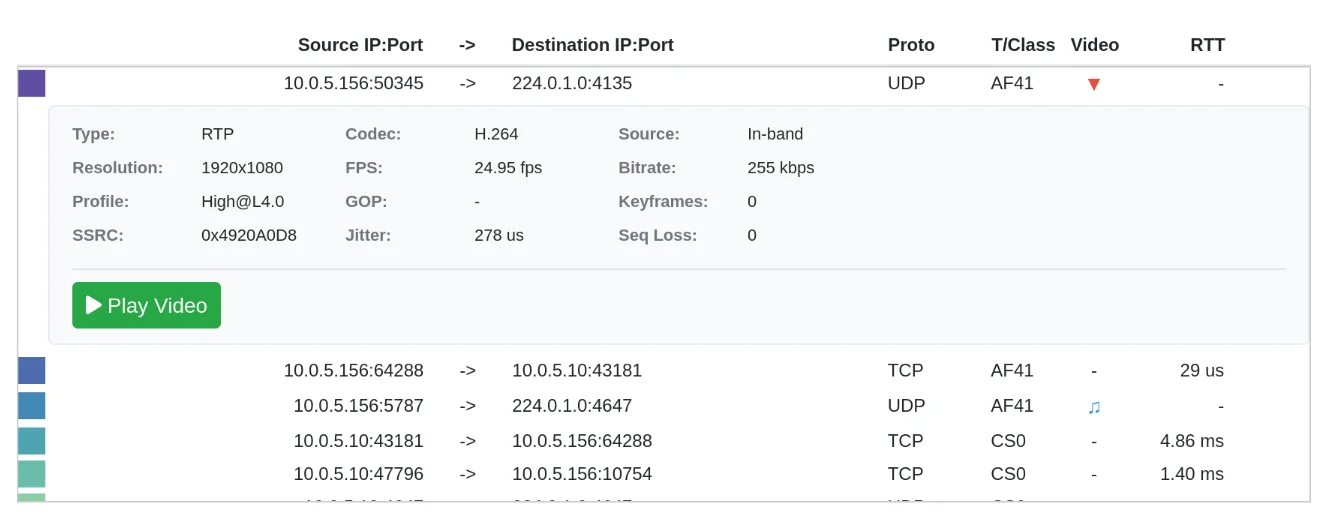
Stream Detection
In the Top Talkers view, streams are identified with icons in the flow table:
| Icon | Type |
|---|---|
| ▶ | Video stream (RTP) |
| ♪ | Audio stream (RTP) |
Click the icon to open the stream player.
Video Playback
The WebRTC Video Stream modal provides:
- Live playback of captured video via WebRTC
- Resolution display (e.g., 1920x1080)
- Frame rate (e.g., 25 fps)
- Timestamp overlay for synchronization
- Fullscreen mode
Supported Codecs
Video:
- H.264 (AVC)
- H.265 (HEVC)
- VP8
- VP9
- AV1
Audio:
- G.711 (μ-law, A-law)
- G.729
- Opus
- AAC
QoS Classification
Streams are classified by DSCP marking visible in the T/Class column:
| Class | Typical Use |
|---|---|
| AF41 | Video conferencing, real-time video |
| AF31 | Streaming video |
| EF | Voice (expedited forwarding) |
| CS0 | Best effort (default) |