Real-Time Streaming Systems
Applying JitterTrap to audio, video, and sensor streaming systems.
Symptoms
Timing problems in streaming systems show up as:
- Audio codecs glitch or drop out
- Video frames arrive late or out of order
- Camera feeds stutter or freeze
- Sensor data arrives in bursts instead of smoothly
The network "looks fine"—throughput is good, ping works—but the application misbehaves.
Applications
JitterTrap is useful for:
- Broadcast & contribution — AES67, Dante, SMPTE ST 2110, AoIP distribution
- Machine vision — GigE Vision cameras, inspection systems
- Vehicle systems — Camera feeds, sensor networks
- Robotics — Vision processing, teleoperation
- Industrial imaging — Production line inspection, quality control
The underlying challenge is the same: timing variance that averages hide.
Test Setup
JitterTrap runs on a Linux machine. Where you place it determines what you can observe and control.
Mirror Port (Observation Only)
Connect to a switch mirror port to observe traffic without affecting the system.

Use this when you need to observe production traffic without risk. You can't inject impairments from a mirror port.
Inline (Impairments + Observation)
Insert JitterTrap between a device and the network. Requires two network interfaces.
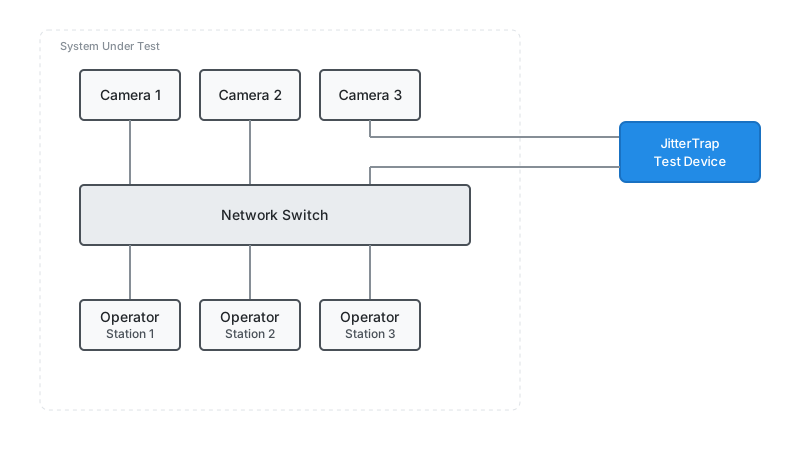
Use this to characterize a specific device. You can inject delay, jitter, and loss to find where the device's stream handling degrades.
Typical Workflow
- Connect JitterTrap (mirror or inline)
- Select the interface carrying stream traffic
- Use Top Talkers to identify your streams by IP/port
- Watch Inter-Packet Gap for timing variance
- Set traps for your application's timing threshold
- Optionally inject impairments to stress test
Relevant Thresholds
| Application | Typical Packet Interval | Threshold to Watch |
|---|---|---|
| AES67 audio (1ms) | 1 ms | Gap > 2 ms |
| 60 fps video | ~16 ms | Gap > 20 ms |
| 30 fps camera | ~33 ms | Gap > 50 ms |
| GigE Vision | Varies by resolution | Gap > frame interval |
Learn More
- Traffic Analysis — Inter-packet timing charts
- Impairments — Inject delay, jitter, loss
- TCP Analysis — For TCP-based streams
- Getting Started — Installation and setup